
Why 429 Is Sometimes a Sign Your System Is Healthy
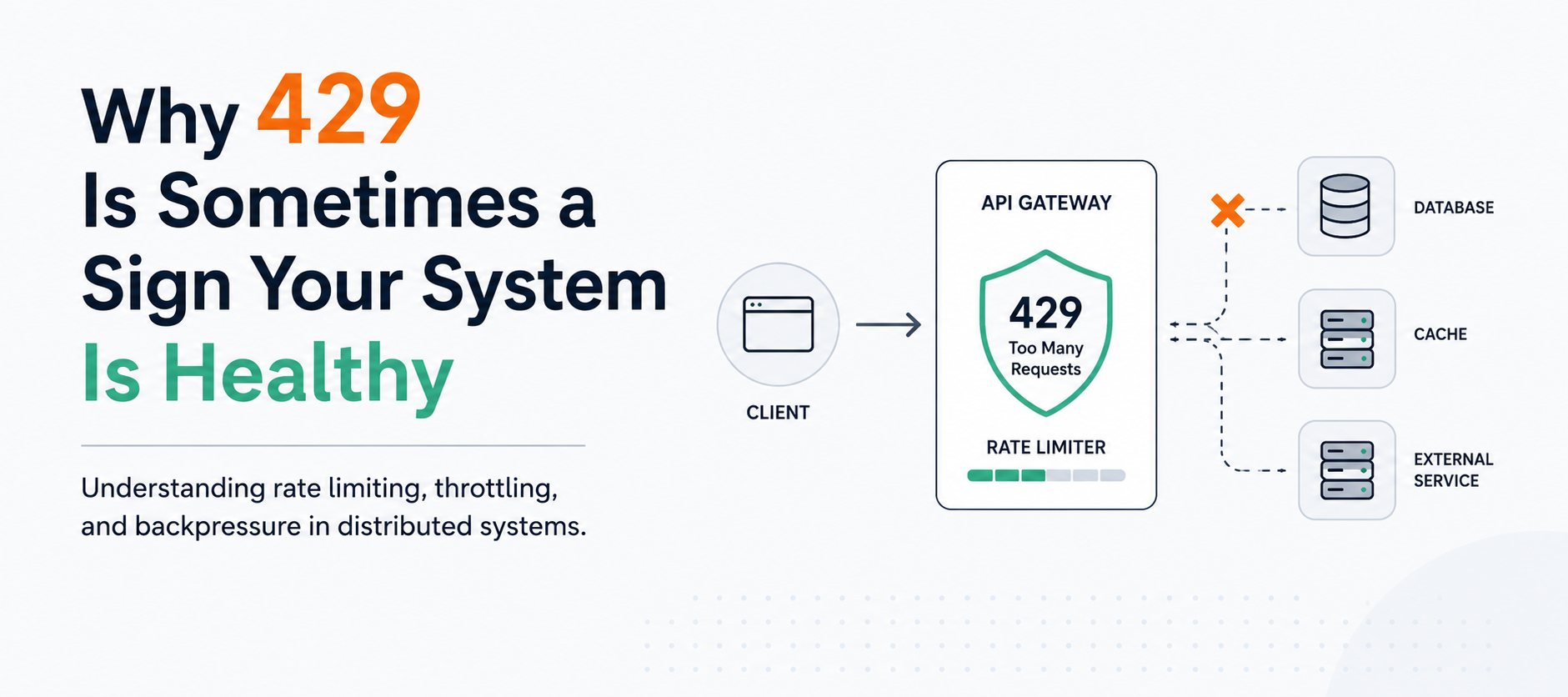
Most engineers don't like seeing HTTP 429 responses.
The first time I started seeing large numbers of them in production logs, my immediate reaction was:
Great, something is broken again.
A 429 response means Too Many Requests. At first glance, it feels like a failure. A user made a request and didn't get the response they expected. Monitoring dashboards start showing errors, alerts begin firing, and support teams start asking questions.
For many engineers, any increase in error responses immediately triggers an investigation.
But after spending more time working with distributed systems, cloud-native applications, and API integrations, I've changed my perspective.
Today, when I see a 429 response, I don't immediately assume there is a problem.
Sometimes it means the opposite.
Sometimes it means the system is protecting itself.
In fact, a healthy rate-limiting strategy is often one of the characteristics of a mature and resilient platform.
The Incident
A while ago, I was investigating a large number of API errors.
The logs contained hundreds of responses similar to this:
HTTP 429 Too Many Requests
The natural question was:
Why are requests failing?
But after digging deeper, I realized I was asking the wrong question.
The more important question was:
Why is the system refusing these requests?
Those are very different investigations.
When we see a 500 Internal Server Error, we usually assume something unexpected happened. A service crashed, a dependency failed, or an unhandled exception occurred.
A 429 response is different.
The system is behaving exactly as designed.
The rejection is intentional.
The system has determined that processing additional requests would negatively impact performance, stability, or fairness for other consumers.
Instead of allowing itself to become overloaded, it chooses to reject excess traffic.
That realization completely changed how I think about throttling.
What 429 Actually Means
Unlike a 500 Internal Server Error, a 429 response is usually intentional.
The server is not crashing.
The server is not throwing an exception.
The server is making a conscious decision.
It is essentially saying:
I could try to process this request, but doing so would hurt the system or other users.
So instead, it rejects the request immediately.
This behavior is commonly known as rate limiting or throttling.
Rate limiting is a mechanism that controls how many requests a client can make within a specific period of time.
For example:
- 100 requests per minute
- 1,000 requests per hour
- 10 requests per second
- 50 concurrent requests
Once the limit is reached, additional requests are rejected until capacity becomes available again.
Many APIs also include a Retry-After header to tell clients when they should try again.
HTTP/1.1 429 Too Many Requests
Retry-After: 30
This tells the client to wait 30 seconds before sending another request.
Imagine a Restaurant
One analogy that helped me understand this better is a busy restaurant.
Imagine a restaurant with:
- 20 tables
- 5 waiters
- 3 cooks
If 500 people suddenly walk through the door, the restaurant has two options.
Option 1: Accept Everyone
Everyone gets a table.
Everyone places an order.
The kitchen becomes overwhelmed.
Food takes two hours.
Orders get mixed up.
Customers become angry.
Staff become stressed.
Eventually the entire operation collapses.
Nobody receives good service.
Option 2: Refuse New Customers
The restaurant says:
Sorry, we're full.
Some customers leave disappointed.
But the customers already inside continue receiving good service.
Orders arrive on time.
The kitchen remains productive.
The restaurant continues operating normally.
Most healthy systems choose Option 2.
A 429 response is the API equivalent of:
Sorry, we're full right now.
It may feel like a failure from the perspective of the rejected request, but from the perspective of the overall system, it is often the correct decision.
Why Rate Limiting Exists
Modern systems have finite resources.
Examples include:
- Database connections
- CPU
- Memory
- Thread pools
- External API quotas
- Message queues
- Network bandwidth
- Storage throughput
Without limits, one client can accidentally consume resources needed by everyone else.
Imagine a single integration partner suddenly sending ten times more traffic than usual.
Or a bug causing a mobile application to continuously retry requests.
Or a scheduled batch job accidentally running every minute instead of every hour.
Without protection mechanisms, these situations can quickly impact all users.
The result is often much worse than a few rejected requests.
Instead of some users being affected, everybody becomes affected.
Rate limiting prevents this.
It creates a controlled boundary around system capacity.
The Alternative Is Usually Worse
When a system does not protect itself, overload tends to spread.
I've seen situations where excessive traffic caused:
- Increased latency
- Connection pool exhaustion
- Cascading timeouts
- Retry storms
- Queue backlogs
- Database lock contention
- Service degradation across multiple components
The dangerous part is that overload rarely stays isolated.
One overloaded service starts responding slowly.
Dependent services begin waiting longer.
Thread pools become exhausted.
Retries increase traffic.
Queues grow larger.
Eventually the entire platform becomes unstable.
This phenomenon is often called a cascading failure.
Ironically, removing rate limits often creates more failures, not fewer.
A controlled rejection is frequently better than an uncontrolled collapse.
The Retry Trap
One of the most dangerous patterns in distributed systems is what I call the retry trap.
A client sends a request.
The request gets throttled.
The client immediately retries.
The retry gets throttled.
The client retries again.
Soon the system is receiving more traffic than before.
The very mechanism intended to recover from failures starts creating additional load.
I've seen integrations where a single failed request generated dozens of retries within seconds.
When thousands of clients behave this way simultaneously, the traffic amplification becomes enormous.
This is why well-behaved clients should implement:
- Exponential backoff
- Retry limits
- Respect for Retry-After headers
- Randomized jitter
- Circuit breakers
For example:
Instead of retrying after 1 second every time:
1 second
1 second
1 second
1 second
Use exponential backoff:
1 second
2 seconds
4 seconds
8 seconds
16 seconds
This gives the system time to recover and significantly reduces pressure during peak load.
Not all failures should be retried immediately.
A Healthy System Knows Its Limits
One lesson I've learned over the years is that healthy systems are not the systems that never reject requests.
Healthy systems are the systems that know when to reject requests.
There is a big difference.
A system that accepts every request may look successful right until the moment it collapses.
A system that occasionally returns 429 responses may actually be protecting availability for everyone else.
This is especially true in cloud environments where resources are shared and scaling is not always instantaneous.
Even highly scalable platforms have limits.
The goal is not infinite capacity.
The goal is predictable and reliable behavior under load.
Rate Limiting in Azure
Azure provides several ways to implement rate limiting depending on your architecture.
Azure API Management
One of the easiest and most powerful approaches is using Azure API Management (APIM).
APIM allows rate limiting without changing application code.
For example:
<rate-limit-by-key calls="100" renewal-period="60"
                   counter-key="@(context.Request.IpAddress)" />
This policy limits clients to 100 requests per minute based on IP address.
You can also rate limit by:
- Subscription key
- User identity
- JWT claims
- API consumer
- Custom headers
This approach is ideal when exposing public APIs because it centralizes traffic management and protects backend services before requests even reach them.
Azure Front Door and WAF
Azure Front Door combined with Web Application Firewall (WAF) can also enforce rate limits at the edge.
This is particularly useful for:
- DDoS mitigation
- Bot protection
- Public-facing APIs
- Global applications
Traffic can be throttled before it reaches your application infrastructure.
Azure Functions Built-In Protection
Azure Functions automatically scales, but scaling is not unlimited.
If a downstream dependency such as SQL Server or an external API cannot handle unlimited traffic, you may still need throttling.
For queue-based workloads, Azure Functions naturally provide some protection through controlled concurrency settings.
For example:
{
  "version": "2.0",
  "extensions": {
    "queues": {
      "batchSize": 16,
      "newBatchThreshold": 8
    }
  }
}
This limits how aggressively queue messages are processed.
Implementing Rate Limiting in ASP.NET Core Web API
Starting with .NET 7, ASP.NET Core includes built-in rate limiting middleware.
A common approach is using a fixed window limiter.
Program.cs
using System.Threading.RateLimiting;

var builder = WebApplication.CreateBuilder(args);

builder.Services.AddRateLimiter(options =>
{
    options.AddFixedWindowLimiter("api", limiterOptions =>
    {
        limiterOptions.PermitLimit = 100;
        limiterOptions.Window = TimeSpan.FromMinutes(1);
        limiterOptions.QueueLimit = 0;
    });
});

var app = builder.Build();

app.UseRateLimiter();

app.MapGet("/weather", () =>
{
    return Results.Ok("Success");
})
.RequireRateLimiting("api");

app.Run();
This configuration allows:
- 100 requests
- Per minute
- Per endpoint
Additional requests receive a 429 response.
Per-User Rate Limiting
A more realistic implementation limits requests per authenticated user.
builder.Services.AddRateLimiter(options =>
{
    options.AddPolicy("per-user", context =>
        RateLimitPartition.GetFixedWindowLimiter(
            partitionKey: context.User.Identity?.Name ?? "anonymous",
            factory: _ => new FixedWindowRateLimiterOptions
            {
                PermitLimit = 100,
                Window = TimeSpan.FromMinutes(1)
            }));
});
This prevents one user from consuming resources intended for others.
Implementing Rate Limiting in Azure Functions
Azure Functions does not currently provide the same built-in HTTP rate limiting capabilities as ASP.NET Core.
A common pattern is to use a distributed cache such as Azure Cache for Redis.
The flow looks like this:
Request
   ↓
Check Redis Counter
   ↓
Below Limit? ── Yes ──> Process Request
   │
   No
   ↓
Return 429
Example:
var count = await redis.StringIncrementAsync($"user:{userId}");

if (count == 1)
{
    await redis.KeyExpireAsync($"user:{userId}",
        TimeSpan.FromMinutes(1));
}

if (count > 100)
{
    return new TooManyRequestsResult();
}
This approach works across multiple function instances because Redis provides a centralized counter.
For production systems, this is generally preferable to storing counters in memory.
What I Look At When I See 429s
Today, when I encounter a large number of 429 responses, I ask several questions before opening an incident.
Is the system overloaded?
If yes, throttling may be expected.
Are clients respecting rate limits?
Poor client behavior can generate unnecessary traffic.
Is the rate limit configured correctly?
Some limits are too aggressive.
Others are too permissive.
Are retries making the problem worse?
This is often where the real issue hides.
Is overall system health still good?
If latency, error rates, and availability remain healthy, then the throttling mechanism may be doing exactly what it was designed to do.
Are specific consumers generating most of the traffic?
A small number of clients often account for a large percentage of requests.
Understanding traffic distribution can reveal whether throttling is protecting the platform from abusive or misconfigured consumers.
Final Thoughts
Nobody likes seeing requests rejected.
But distributed systems are full of trade-offs.
Sometimes the choice is not:
Success or failure.
Sometimes the choice is:
Reject a few requests now, or fail many requests later.
That is why I've stopped treating every 429 response as a problem.
In many cases, a 429 is evidence that the system understands its own limits and is actively protecting itself.
A well-designed rate limiter protects downstream services, preserves availability, prevents cascading failures, and ensures fair resource consumption across users and integrations.
The next time you see a spike in HTTP 429 responses, don't immediately assume something is broken.
Ask a different question:
Is the system failing, or is the system successfully protecting itself?
In distributed systems, the answer is often the latter.
And that's usually a sign of good engineering.